
SASSA Biometric ID Verification 2026: What Every Grant Beneficiary Must Know
How to complete online, fix failures, eLife certification, R370 grant process, status check, BBE programme statistics, and scam warnings.
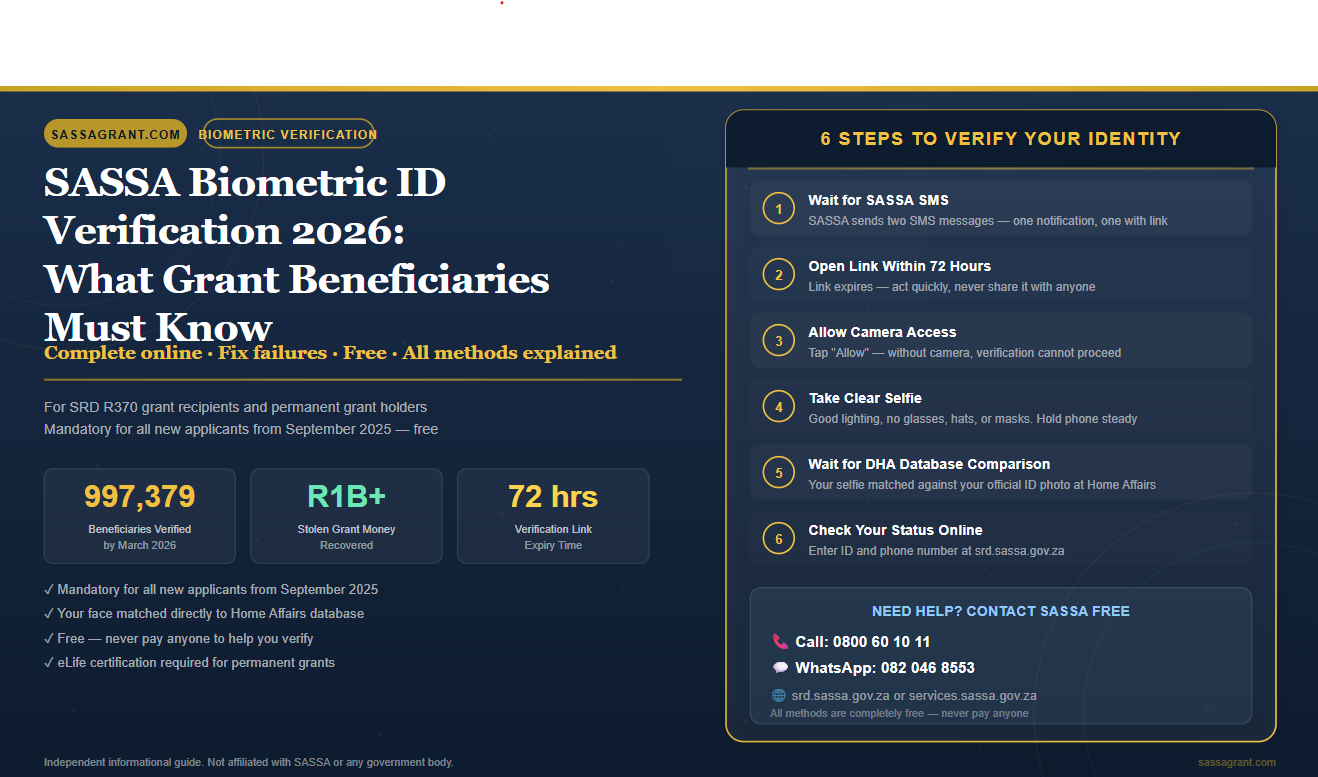
SASSA biometric ID verification is a security check that uses your face or fingerprints to confirm who you are. It is mandatory for new applicants and for anyone updating their grant details. You will receive an SMS with a link. Click the link, allow camera access, and take a clear selfie. SASSA checks your face against your Department of Home Affairs ID photo to approve your grant.
Check Your Verification Status Now
Go to the official SRD portal. Enter your ID and phone number. Free.
- What Is SASSA Biometric ID Verification
- Who Needs to Do Biometric Verification
- How to Complete Online: Step-by-Step
- How to Complete at a SASSA Office
- The SASSA Verification Link Explained
- Biometric Verification for the R370 Grant
- Verification Status Check
- Common Reasons Verification Fails
- How to Fix a Failed Verification
- SASSA eLife Certification
- BBE Programme: Key Facts and Statistics
- How to Avoid SASSA Verification Scams
1. What Is SASSA Biometric ID Verification
SASSA biometric ID verification is the answer to a big problem. Millions of people depend on social grants every month. But criminals have been stealing those grants. So SASSA had to act.
Biometric verification uses your body to prove who you are. It checks your face or your fingerprints. These things cannot be faked easily. And that is exactly the point.
SASSA links this data directly to the Department of Home Affairs (DHA) database. Your live selfie or fingerprint gets compared to your official ID photo. If they match, you are confirmed. And your grant is safe.
This system is called the Beneficiary Biometric Enrolment (BBE) programme. It is the biggest change SASSA has made to its grant system in years. It is not just about fraud. It is about protecting your money from people who want to steal it.
Why Did SASSA Introduce Biometrics
- Identity fraud in South Africa grew by 162% in 2024 alone.
- Old green ID books had a 34% fraud rate. Criminals used faded photos to claim other people’s grants.
- Ensure grants go to the right person. Stop duplicate accounts. Prove that grant recipients are still alive.
- By March 2026, nearly 997,379 beneficiaries had been verified. Over R1 billion in stolen grants had been recovered.

2. Who Needs to Do Biometric Verification
Not every grant recipient needs to rush to an office right now. But many do. So it is important to know if this applies to you.
✓ You Must Verify If
- You are applying for a SASSA grant for the first time after 1 September 2025
- You are updating your banking details
- You are changing your cellphone number on the SASSA system
- SASSA has sent you an SMS or letter asking for a grant review
- Your grant has been suspended or flagged
→ You Do NOT Need to Visit If
- You are already receiving your grant normally
- You have NOT received any SMS or letter from SASSA asking for a review
- You have already completed biometric verification successfully
Many people rush to SASSA offices unnecessarily. If SASSA has not contacted you, your grant is fine. You do not need to go anywhere. But if you do get that SMS, act quickly. Delays can lead to suspension.
3. How to Complete Online: Step-by-Step
The online process is the most common way to complete your SASSA biometric verification. It is designed to be done from home. But you need a smartphone with a working camera and a stable internet connection.
- 1
Wait for the SASSA SMS
SASSA will send you two SMS messages. The first tells you that verification is required. The second contains the SASSA verification link. This link is your key. Do not share it with anyone.
- 2
Open the Verification Link
Click the link in the second SMS. Open it in your phone’s browser. The link is valid for 72 hours only. Use it quickly. Do not give it to people who offer to help you “for a fee.” That is a scam.
- 3
Allow Camera Access
Your phone will ask for camera permission. Tap “Allow.” Without camera access, the verification cannot happen.
- 4
Take Your Live Selfie
The system uses AI-powered liveness detection to confirm you are a real, live person — not a photo or video. Find good lighting. Remove glasses, hats, and face coverings. Look directly at the camera. Hold your phone steady. The system will capture your image automatically.
- 5
Wait for Confirmation
Your selfie is compared to your Department of Home Affairs photo. This check happens quickly. But the full grant approval may take a few days. Check your SASSA status or call 0800 60 10 11.
4. How to Complete at a SASSA Office
Not everyone has a smartphone. Not everyone has data. And that is okay. SASSA has set up all 432 local offices with kiosks, laptops, and guest Wi-Fi to help you. This is also the route if your online verification has failed or if you cannot receive an SMS.
What to Bring
- Your original South African ID document. Smart ID Card is preferred.
- Green ID book is also accepted, but may cause facial recognition issues.
- Any letter or SMS from SASSA that asked you to come in.
What Happens at the Office
A SASSA official will capture your fingerprints or your photo. The standard process captures four fingerprints — your thumbs and index fingers on both hands. This is matched instantly against the Home Affairs database.
If you have damaged fingerprints due to work or medical conditions, tell the official. They have a special process for this. Facial recognition can often be used instead.
Do not pay anyone to stand in a queue for you. SASSA has warned that selling queue spots is illegal. If someone offers this, walk away.
5. The SASSA Verification Link Explained
The SASSA verification link is a secure, personalised URL sent to your registered phone number by SMS. It is unique to you. And it opens a secure web portal where you complete your biometric facial scan. This link is strictly valid for 72 hours. After that, it expires.
How to Request a New Verification Link
- 1
Visit srd.sassa.gov.za
Go to srd.sassa.gov.za and enter your ID number and registered cellphone number.
- 2
Check for a New Link Request Option
The portal may allow you to request a new verification link directly.
- 3
Call 0800 60 10 11 If Needed
Call 0800 60 10 11 for assistance if the portal does not show the option.
- 4
Visit Your Nearest SASSA Office
If your phone number is not on the SASSA system, or if your link has expired with no alternative, visit your nearest SASSA office in person.
Only use links from official SASSA SMS messages. Never click links from WhatsApp groups, Facebook, or strangers. These are SASSA scams. They will steal your personal information.
6. Biometric Verification for the R370 Grant
The SASSA R370 grant biometric verification is specifically required for Social Relief of Distress (SRD) grant recipients. The SRD grant has the most digital-first process. When you apply or update your details on the SRD portal, the system automatically triggers a biometric check. For a complete overview, see our SRD R370 complete guide.
When the System Triggers a Biometric Check
- Applying for the grant for the first time
- Changing your banking details
- Updating your cellphone number — see how to change your phone number with SASSA
- Being flagged by the system for any reason
Updating Banking Details on the R370 Grant
Your banking details can only be updated if the bank account is registered in your name. It must match your ID exactly. You cannot update banking details to someone else’s account. This rule is strict. And it protects you. For step-by-step help, see how to update your SASSA banking details.
Updating Your Cellphone Number on the R370 Grant
Changing your phone number requires a two-step OTP process. You receive one OTP on your old number and one on your new number. Both must be confirmed. If your old SIM is lost or inactive, you must visit a SASSA office. Staff will capture your fingerprints in person to bypass the OTP requirement.
7. Verification Status Check
After you complete your verification, here is how to check if it worked.
How to Check Online
- Go to srd.sassa.gov.za for SRD/R370 grants. Enter your ID number and phone number.
- Go to services.sassa.gov.za for all other grants.
- Call 0800 60 10 11 (toll-free) for status confirmation.
- WhatsApp SASSA on 082 046 8553.
What Each Status Means
Verified
Your identity has been confirmed. Your grant will proceed. No action needed.
Pending
Your verification is being reviewed. Wait a few days and check again.
Identity Verification Failed
A problem was found. See Section 8 for common causes and Section 9 for fixes.
Referred
Your case has been flagged for manual review. Contact SASSA on 0800 60 10 11.
Suspended
Your grant has been paused. Action is required immediately. Call 0800 60 10 11. If your grant is approved but no payment date appears, see our guide.
8. Common Reasons Verification Fails
Many people see “Identity Verification Failed” on their status. It is scary. But it does not always mean your grant is cancelled. It means something needs to be fixed.
| Reason | What It Means | How to Fix It |
|---|---|---|
| Poor Selfie Quality | Bad lighting, glasses, hat, or mask during selfie | Retry in bright natural light. Remove all face coverings. |
| Outdated Home Affairs Records | Name change after marriage or divorce not updated | Visit Home Affairs. Update your records. Get a stamped confirmation letter. |
| Green ID Book Photo Issues | Faded old photo fails facial recognition (34% fraud rate) | Apply for a Smart ID Card from the Department of Home Affairs. |
| Incorrectly Marked as Deceased | Clerical error at Home Affairs triggers grant suspension | Visit Home Affairs immediately. Get a formal correction letter. Then visit SASSA. |
| Shared Phone Number | Another household member uses the same registered number | Update your registered number to a unique number in your name only. |
| Expired or Flagged ID | ID was reported lost or stolen | Get a new valid ID document from Home Affairs before applying. |
9. How to Fix a Failed Verification
A failed verification is not the end. There are steps you can take to fix it. Act quickly. The sooner you act, the sooner your grant is restored.
- 1
Check Your Selfie and Try Again
Log in to the SASSA portal and try the verification again. Use bright natural light. Remove glasses and any face coverings. Hold your phone at eye level. Do not tilt your head.
- 2
Visit the Department of Home Affairs
This is the most important step for most failures. Home Affairs holds the records SASSA checks against. Bring your original ID, birth certificate, proof of address, and your marriage certificate if your name changed. Ask them to check and update your records. Get a written, stamped confirmation letter.
- 3
Visit Your Nearest SASSA Office
Take your ID and your Home Affairs confirmation letter to SASSA. Explain what happened. Ask for manual verification. If needed, submit a formal appeal. You have 90 days from the date of decline to appeal to the Independent Tribunal for Social Assistance Appeals. For SRD R370 grants, you must appeal every declined month separately. For help, see how to appeal SASSA online.
- 4
Follow Up
Wait 7 to 14 days after addressing the issue. Check your status regularly. If nothing changes after 30 days, call 0800 60 10 11.
10. SASSA eLife Certification
If you receive a permanent SASSA grant — like the Old Age Pension, Disability Grant, or Child Support Grant — you may need to complete SASSA eLife Certification. This is a digital proof-of-life process. It confirms that you are still alive and still eligible for your grant.
How to Complete eLife Certification Online
- 1
Visit services.sassa.gov.za
Go to services.sassa.gov.za and log in with your credentials.
- 2
Find eLife Certification
Navigate to the “eLife Certification” section in the portal.
- 3
Complete the Live Facial Scan
Allow camera access on your device. Follow the prompts to complete a live facial scan. Submit. Your eligibility is confirmed.
SASSA will interpret non-compliance as a sign that the account may belong to a deceased person. Your grant will be suspended immediately. Do not ignore SASSA communications when this is due.
If you do not have a smartphone, go to your nearest SASSA office. They will help you complete the process using their equipment.
11. BBE Programme: Key Facts and Statistics
The numbers tell a powerful story. The Beneficiary Biometric Enrolment (BBE) programme has already changed thousands of lives. Some for the better. Some with painful disruption.
| Fact | Number |
|---|---|
| Total beneficiaries verified (by March 2026) | 997,379 |
| Grant suspensions due to non-verification | 68,000 |
| Child Support Grant suspensions (Q3) | 37,825 |
| Old Age Grant suspensions (Q3) | 20,429 |
| Disability Grant suspensions (Q3) | 7,908 |
| Facial recognition complaints received | 7,779 |
| Fiscal savings from fraud prevention | Over R1 billion |
| Local SASSA offices equipped with kiosks | 432 |
| BBE contract value (Cyber One) | R29.9 million |
12. How to Avoid SASSA Verification Scams
The biometric verification process has created a new opportunity for scammers. They target scared, confused people. And they take advantage of their desperation. If you have lost your SASSA reference number, recover it through official channels only.
🚨 SASSA Verification Scam Warning
What SASSA Will Never Do
- Ask for your banking PIN or password
- Send verification links through social media
- Charge you any fee for verification
- Ask you to pay to receive your grant
SASSA Will Never
Need Help? Call SASSA Free
A real agent will guide you through verification, fix failures, and check your status.
Key Takeaways
- SASSA biometric ID verification is mandatory for all new grant applicants from September 2025 and for anyone updating their details.
- You will receive a verification link by SMS. It is valid for 72 hours only. Use it immediately.
- Complete the process online using a selfie, or visit your nearest SASSA office for fingerprint capture.
- If you already receive your grant and have not been contacted by SASSA, you do not need to do anything.
- Verification failures are often caused by poor lighting, outdated Home Affairs records, or green ID book photo issues.
- Fix failures by visiting Home Affairs first, then SASSA, and requesting manual verification.
- Nearly 997,379 beneficiaries have been verified. Over R1 billion in fraudulent grants has been stopped.
- Never pay anyone to help you with verification. It is free. Always use official SASSA channels only.
Found This Helpful?
Share this article to help someone who is struggling with their SASSA verification. You could save their grant.
Sources and References
- 1.South African Social Security Agency. Official Website. sassa.gov.za. Accessed May 2026.
- 2.SASSA SRD Portal. srd.sassa.gov.za. Accessed May 2026.
- 3.SASSA Online Services. services.sassa.gov.za. Accessed May 2026.
- 4.IOL News. “Step-by-step guide to using SASSA’s eLife certification.” April 2026.
- 5.TYB.co.za. “Complete SASSA Identity Verification Guide for 2026.”
- 6.Department of Home Affairs. HANIS and ABIS Biometric Systems. dha.gov.za.
- 7.SASSA Helpline. 0800 60 10 11 (Toll-Free). Accessed May 2026.
- 8.SASSA WhatsApp. 082 046 8553. Accessed May 2026.
This article has been written and published by the SassaGrant Research Desk for general informational purposes only. The information provided is based on publicly available data and independent research. SassaGrant.com is not affiliated with, endorsed by, or connected to the South African Social Security Agency (SASSA) or any government department.
Grant rules, payment amounts, and verification processes can change at any time. Always verify the latest information directly with SASSA at sassa.gov.za or by calling the toll-free helpline on 0800 60 10 11 before taking any action regarding your grant.