
SASSA Approved but No Payment Date Yet? What to Do in 2026
Your status shows SASSA Approved but no Pay Day appears yet. Here is exactly why this happens, how long it takes, and what to do while you wait.
Check Your SASSA Payment Date Now
Go to the official SRD portal and confirm whether your Pay Day has been assigned
If your SASSA status shows Approved but no payment date has appeared yet, do not panic. Approved means you passed all eligibility checks. Your personal Pay Day is generated separately in batches. It appears within a few days to two weeks after your Approved status. Keep checking the portal at SASSA every 2 to 3 days.
You checked your status. It says Approved. Your heart lifts. Then you look for a payment date. Nothing is there.
This happens to millions of South Africans every single month. It causes real anxiety. Real fear. Real confusion.
This guide explains exactly what is happening behind the scenes, why your Pay Day has not appeared, and the specific steps you can take to make sure your money arrives on time.
- What Does SASSA Approved Actually Mean
- Why Is There No Payment Date After Approval
- How Long Does the Payment Date Take to Appear
- How to Check Your SASSA Payment Date
- SASSA Approved but No Payment Date — Every Reason Explained
- What to Do While Waiting
- When Should You Actually Worry
- How to Fix Common Payment Date Problems
- SASSA Payment Dates May and June 2026
- Frequently Asked Questions
- Sources and References
- ✓Approved does not mean payment is immediate. It means you qualified. Pay Day comes in a separate batch process.
- ✓Pay Day appears within 3 to 14 days after your Approved status in most cases.
- ✓Check the portal every 2 to 3 days, not every hour. Updates happen in batches, not in real time.
- ✓Do not reapply. An Approved status is active. Reapplying causes confusion and delays.
- ✓Banking details must be verified before any Pay Day can be assigned. Update them immediately if showing as Pending.
- ✓Biometric verification blocks payment. Check your SMS for a SASSA verification link and complete it immediately.
- ✓Call 0800 60 10 11 if nothing appears after 14 days. It is toll-free.
- ✓Your money does not disappear if Pay Day passes uncollected. It remains available in your account.
1. What Does SASSA Approved Actually Mean
You checked your status. It says Approved. Your heart lifts. Then you look for a payment date. Nothing is there.
This happens to millions of South Africans every single month. It causes real anxiety. Real fear. Real confusion. So let us be completely clear about what Approved actually means.
Approved means SASSA has confirmed you are eligible for the SRD R370 grant for this specific month. The system has verified three things:
- Your identity matches Department of Home Affairs records.
- Your income is below the R625 threshold.
- You are not receiving any conflicting benefit such as UIF, NSFAS, or another SASSA grant.
That is all Approved means. It is a confirmation of eligibility. It is not a confirmation that money has been released. It is not a confirmation that a payment date exists yet. The payment process is a separate step. It happens after Approved. Understanding this removes the confusion completely.
2. Why Is There No Payment Date After Approval
Your SASSA payment date does not appear at the same time as your Approved status because SASSA processes over 7.5 million SRD applications every single month.
The system cannot generate personal Pay Day dates for everyone at exactly the same moment. It works in batches. Your approval comes first. Your Pay Day is calculated and assigned in a separate processing run that happens days later.
Think of it like a queue. You have been confirmed as eligible. Now you are waiting for your number to be called for payment. The queue moves in batches throughout the month.
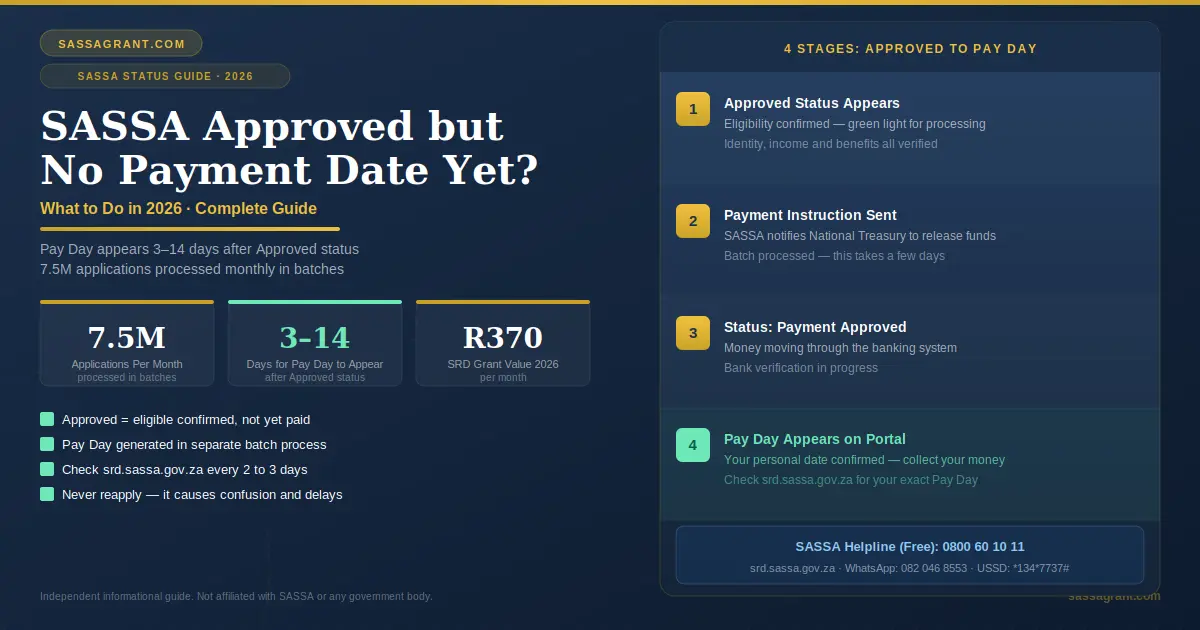
Here is what happens step by step after you see Approved
- 1
Approved Status Appears
SASSA has verified your eligibility. This is the green light for processing to begin.
- 2
Payment Instruction Sent
SASSA sends your payment instruction to the National Treasury. This authorizes the release of funds for your specific case.
- 3
Status Changes to Payment Approved
Your money is now moving through the banking system. Verification with your bank is in progress.
- 4
Pay Day Appears on the Portal
Your personal payment date is finalized. This is the date your money will be available for collection or deposit.
Each step takes time. The gap between Approved and Pay Day appearing is completely normal. It is part of how the system works.
3. How Long Does the Payment Date Take to Appear
For most beneficiaries, the Pay Day appears within 3 to 7 days after the Approved status shows. For others it can take up to 2 weeks depending on which batch they fall into.
| Day | What Usually Happens |
|---|---|
| Day 1 | Your status changes to Approved. |
| Day 3 to 7 | Status changes to Payment Approved. Pay Day date appears. |
| Day 7 to 14 | Pay Day appears for later batches. |
| Day 14 plus | If nothing shows, action may be needed. |

4. How to Check Your SASSA Payment Date
You can check your SASSA payment date through five official methods. Use whichever works best for you.
- 1
Official SRD Portal: Recommended
Go to srd.sassa.gov.za. Enter your 13-digit ID number. Enter your registered phone number. Submit. Your status and Pay Day date will appear if it has been assigned.
- 2
USSD Code: No Data Needed
Dial *134*7737# from any phone. Follow the menu. Enter your ID number. Your current status and Pay Day will show on screen.
- 3
WhatsApp
Send a message to 082 046 8553. Type “Status.” Follow the automated prompts. Your payment information will appear.
- 4
Moya App: Data-Free
Open the Moya App. Tap Discover. Select SASSA Grants. Enter your ID and phone number. Tap Check Status. This is completely data-free on MTN, Vodacom, Telkom, and Cell C.
- 5
Call the Helpline
Call 0800 60 10 11. This is toll-free. An agent will check your payment status directly. Use this if all digital methods are giving you no results.
5. SASSA Approved but No Payment Date — Every Reason Explained
There are several specific reasons why your SASSA approved status has no payment date yet. Each one has a different solution.
Reason 1. Batch Processing Delay
This is the most common reason. Your approval is confirmed. But your payment batch has not been processed yet. SASSA runs millions of payments in waves throughout the month. Your wave simply has not come yet.
What to do. Wait and keep checking. Your Pay Day will appear within the payment window.
Reason 2. Bank Details Not Verified
Your application may be approved. But if SASSA cannot verify your banking details, your Pay Day cannot be generated. The system needs a confirmed, active bank account in your name before it can assign a payment date. This shows as Bank Details Pending on the portal.
What to do. Go to srd.sassa.gov.za immediately. Update your banking details. Enter your bank name, account type, and account number. Submit. Verification takes 7 to 14 days.
Reason 3. Recent Banking Detail Change
You recently changed your bank account. The new details are still being verified between SASSA and your bank. Until verification completes, no Pay Day can be assigned.
What to do. Wait for verification to complete. This takes 7 to 14 working days. Do not change your banking details again during this period. Changing them again restarts the verification process.
Reason 4. Biometric Verification Pending
Your application is approved. But SASSA has flagged your account for biometric identity verification. No Pay Day will be assigned until you complete this step.
SASSA will send you an SMS with a secure link. Click the link. Take a selfie. The system matches your face to your Home Affairs photo. Once verified, your Pay Day will be assigned. If you do not have data or a smartphone camera, visit your nearest SASSA office. They have self-service kiosks and free Wi-Fi.
What to do. Check your SMS inbox for a verification link. Complete it immediately. Do not delay.
Reason 5. High Application Volume at Month Start
At the beginning of each month, over 10 million SASSA applications are processed simultaneously. Government servers experience high load. This slows down the generation of personal Pay Day dates for everyone.
What to do. Be patient. This resolves itself within days. Check the portal again after a week.
Reason 6. Phone Number Mismatch
You are checking your status using a different phone number than the one registered on your application. The system cannot match your record. So no Pay Day appears. If you need to change your phone number, follow the official process.
What to do. Make sure you are entering the exact number you used when you first applied. Even one digit difference means no result.
Reason 7. New Applicant First Month
If this is your first approved month, Pay Day dates take slightly longer to generate. The system needs to set up your full payment profile for the first time.
What to do. Wait up to 14 days. Your Pay Day will appear. If it does not, call the helpline.

6. What to Do While Waiting
Waiting is hard. Especially when you need money. Here is exactly what to do while you wait for your Pay Day to appear.
- Check the portal every 2 to 3 days. Not every hour. The system updates in batches. Checking too frequently causes unnecessary stress without new information.
- Make sure your banking details are correct. Log into srd.sassa.gov.za. Confirm your bank account details are showing correctly. An error here blocks your Pay Day permanently.
- Check your SMS inbox. SASSA may have sent you a biometric verification link. Check your messages including spam. Act on any official SASSA SMS immediately.
- Do not reapply. Your application is already approved. Reapplying will not speed up your Pay Day. It can actually create confusion in the system and cause further delays.
- Do not change your banking details. Unless there is a genuine error. Changing details restarts the verification process and pushes your Pay Day even further back.
- Write down the date you saw Approved. This helps you track the 14-day window. If Pay Day still does not appear after 14 days, you have a clear record of when to start following up.
7. When Should You Actually Worry
Not every delay is a problem. But sometimes action is genuinely needed. Here are the situations that should trigger a phone call to the helpline.
Approved for More Than 14 Days
Your status has shown Approved for more than 14 days and no Pay Day has appeared. Time to follow up.
Payment Approved but No Pay Day
Your status shows Payment Approved but no Pay Day date is visible after several days.
Biometric Done but No Date
You completed biometric verification but still no Pay Day after 7 days.
Banking Verified but No Payment
Your banking details show as verified but still no payment after 2 weeks.
8. How to Fix Common Payment Date Problems
Banking Details Showing as Pending
Go to srd.sassa.gov.za. Find the banking details section. Enter your ID. Follow the SMS link. Update your bank name, account type, and account number. Submit. Allow 7 to 14 working days for verification.
Wrong Phone Number on Application
Call 0800 60 10 11. Ask the agent to update your registered mobile number. You may need to visit a SASSA office with your original ID for security verification.
Biometric Verification Blocking Payment
Check your SMS for the SASSA verification link. Click it immediately. Complete the selfie verification. If you cannot do this on your phone, visit your nearest SASSA office. Bring your original ID. Staff will assist you at no charge.
Payment Reversed After Being Processed
Sometimes money is sent but bounces back. This happens when your bank account is inactive or the name on the account does not match your SASSA records. Contact your bank. Confirm your account is active. Confirm your name matches your ID exactly. Update your banking details on the portal. Allow 7 to 14 days for reprocessing.
SASSA charges nothing to check or update your status. Anyone asking for money to “speed up” your payment is running a scam. Report fraud to 0800 601 011 or visit www.sabric.co.za.
9. SASSA Payment Dates May and June 2026
These are the confirmed payment dates for permanent grants. The SRD R370 grant pays in personal batches throughout the last week of each month.
| Grant Type | May 2026 | June 2026 |
|---|---|---|
| Older Person’s Grant | 4 May | 1 June |
| Disability Grant | 5 May | 2 June |
| Children’s Grants | 6 May | 3 June |
| SRD R370 Grant | 25 to 30 May | 24 to 30 June |
10. Frequently Asked Questions
11. Sources and References
- →South African Social Security Agency. Official SRD Portal. srd.sassa.gov.za. Accessed May 2026.
- →South African Social Security Agency. Official Website. sassa.gov.za. Accessed May 2026.
- →Department of Social Development. SRD Appeals Portal. srd.dsd.gov.za/appeals. Accessed May 2026.
- →grantza.org.za. SASSA Payment Dates May and June 2026. Accessed May 2026.
- →South African Government. Facebook Payment Dates Announcement May 2026.
- →Postbank South Africa. SRD Payment Processing Update 2026.
- →National Treasury South Africa. SRD Grant Fund Allocation 2026/2027.
- May 2026: Article published. Payment dates for May and June 2026 confirmed. Batch processing timelines updated.