
How to Fix Your SASSA Card Declined at an ATM 2026
Every reason your card was declined and exactly how to fix it. PIN resets, ATM error codes, the Gold-to-Black Card swap, and what to do if your card is lost.
Swap Your Gold Card to the Black Card Now
The Gold Card deadline is 31 August 2026. The swap is free at Shoprite, Checkers, Boxer, and Usave.
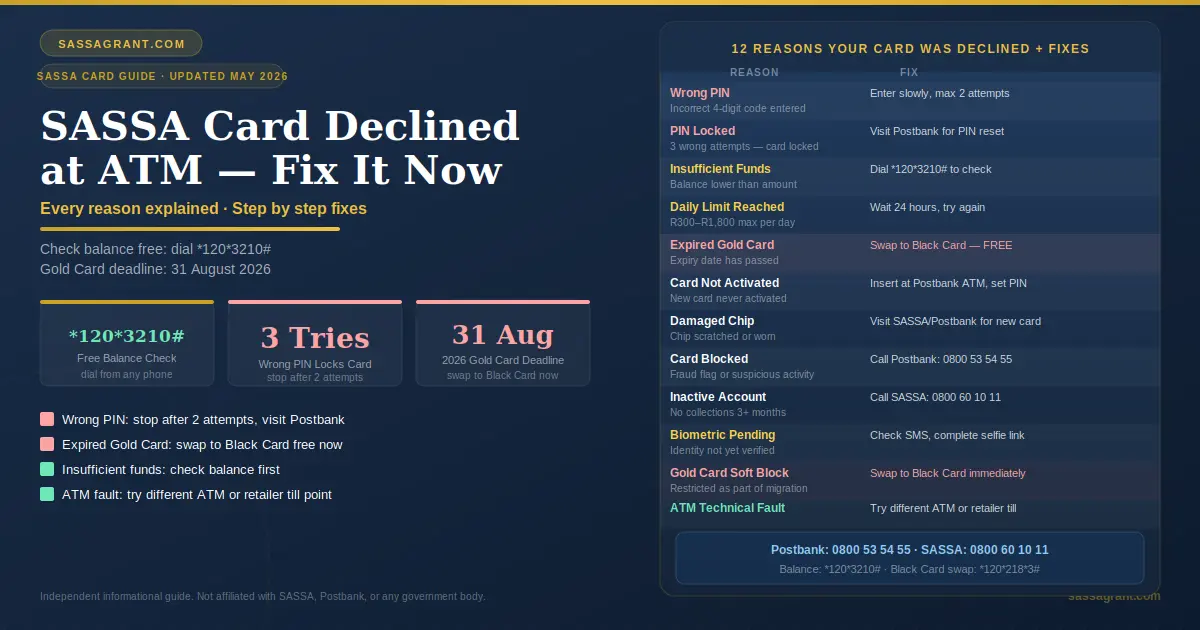
A SASSA card declined at an ATM is usually caused by an incorrect PIN, insufficient funds, an expired Gold Card, reaching the daily withdrawal limit, or a blocked account. Try a different ATM first. Check your balance using *120*3210#. Reset your PIN at a Postbank branch. If your Gold Card has expired, swap to the new Postbank Black Card at Shoprite, Checkers, Boxer, or Usave with your ID.
Standing at an ATM with no money. Your card declined. People are behind you in the queue. This moment is stressful and frightening for millions of South Africans every month.
The good news is that most SASSA card declines at ATMs can be fixed. Many fixes take just a few minutes. But you must first understand why the decline happened.
A declined card does not always mean your grant was not paid. It does not always mean something is wrong with your account. It can be as simple as a wrong PIN or using the wrong ATM.
- Why Is Your SASSA Card Declined at an ATM
- Every Reason Explained Simply
- How to Fix Each Problem — Step by Step
- ATM Error Codes — What They Mean
- How to Reset Your SASSA Card PIN
- How to Replace Your SASSA Card
- Gold Card to Black Card — What You Must Do Now
- Alternative Ways to Access Your Grant Money
- Lost or Stolen SASSA Card — Act Immediately
- Scam Warning — Protect Your Card
- Frequently Asked Questions
- Sources and References
- ✓Most SASSA card declines are caused by wrong PIN, insufficient funds, expired Gold Card, or daily limit reached. Each has a quick fix.
- ✓Check your balance first before going to any ATM. Dial *120*3210# for free.
- ✓Three wrong PIN attempts locks your card. Stop after two attempts and visit Postbank for a reset.
- ✓Gold Card deadline is 31 August 2026. Swap to the Black Card now at Shoprite, Checkers, Boxer, or Usave. It is free. Learn about SASSA card renewal options before the deadline.
- ✓Biometric verification blocks your payment until completed. Check your SMS for the SASSA verification link.
- ✓Try a retailer till point if the ATM keeps failing. Shoprite, Checkers, Pick n Pay, and Boxer all accept SASSA cards.
- ✓Lost or stolen card. Call SASSA on 0800 60 10 11 and Postbank on 0800 53 54 55 immediately.
- ✗Never share your PIN with anyone. Not family. Not SASSA staff. Not strangers at the ATM. The Black Card swap is always free. Anyone charging a fee is a scammer.
1. Why Is Your SASSA Card Declined at an ATM
Standing at an ATM with no money. Your card declined. People behind you in the queue. This moment is stressful and frightening for millions of South Africans every month.
The good news is that most SASSA card declines at ATMs can be fixed. Many fixes take just a few minutes. But you must first understand why the decline happened.
A declined card does not always mean your grant was not paid. It does not always mean something is wrong with your account. It can be as simple as a wrong PIN or using the wrong ATM.
2. Every Reason Explained Simply
Here is every reason your SASSA card was declined at an ATM explained in simple language.
| Reason | What It Means |
|---|---|
| Wrong PIN | You entered the incorrect 4-digit code. |
| PIN Tries Exceeded | You entered the wrong PIN 3 times. Card is locked. |
| Insufficient Funds | Your account balance is lower than the amount requested. |
| Daily Withdrawal Limit Reached | You have already withdrawn the maximum allowed today. |
| Expired Card | Your Gold Card validity date has passed. |
| Card Not Activated | New or replacement card was never activated. |
| Damaged Card Chip | The chip or magnetic strip is scratched or worn. |
| Card Blocked by Bank | Suspicious activity or fraud flag triggered a block. |
| Inactive Account | Account not used for 3 or more consecutive months. |
| Biometric Verification Pending | Your identity needs to be confirmed before payment releases. |
| Gold Card Soft Block | Your Gold Card has been restricted as part of the Black Card migration. |
| ATM Technical Fault | The specific ATM is out of cash or experiencing a system error. |
| Linked Account Issue | Your linked personal bank account is inactive or has pending issues. |

3. How to Fix Each Problem Step by Step
Wrong PIN
Your SASSA card PIN must be entered correctly every time. One wrong attempt is fine. But be careful.
Fix. Stop and think before trying again. Enter your PIN slowly and carefully. Make sure no one is watching over your shoulder. Do not exceed two attempts at one session. Three wrong attempts locks your card automatically.
PIN Tries Exceeded
You entered the wrong PIN three times. Your card is now locked. This is a security measure. It protects your money from unauthorized access.
Fix. Do not keep trying. Visit your nearest Postbank branch or participating retailer. Bring your original South African ID. Ask for a PIN reset. A staff member will verify your identity and reset your PIN. The first PIN reset per year is free. You can also call Postbank on 0800 53 54 55 for guidance.
Insufficient Funds
Your grant may not have arrived yet. Or you may have already withdrawn everything. Check your SASSA status to confirm payment has been released.
Fix. Check your balance first before going to an ATM. Dial *120*3210# from your phone. This is free and shows your available balance instantly. For more details on payment timing, see SASSA payment dates 2026.
Daily Withdrawal Limit Reached
SASSA card withdrawal limits are set between R300 and R1 800 per day depending on your card type and account. If you have already withdrawn your daily maximum, further transactions will be declined.
Fix. Wait until the next 24-hour cycle resets your limit. Then try again. If you need more cash urgently, visit a Postbank branch to request a limit increase with your ID.
Expired Card
Your SASSA Gold Card has an expiry date printed on the front. Once that date passes, the card stops working completely.
Fix. You must replace your Gold Card with the new Postbank Black Card immediately. Visit Shoprite, Checkers, Boxer, or Usave with your original South African ID. The swap is free. Your balance transfers automatically to the new card. For other options, see how to switch your SASSA card to Capitec Bank.
Card Not Activated
You received a new or replacement card. But you never activated it. An unactivated card will be declined at every ATM.
Fix. Insert your new card into any Postbank ATM. Follow the prompts to set your new PIN. This activates the card. You can also visit a Postbank branch with your ID for assisted activation.
Damaged Card Chip
The metal chip on your card may be scratched. The magnetic strip may be worn down. ATMs cannot read a damaged card.
Fix. Do not try to scratch or clean the chip yourself. Visit your nearest SASSA office or Postbank branch with your original ID. Request a card replacement. Bring the damaged card with you.
Card Blocked by Bank
Your card may be blocked due to suspicious activity. Multiple failed PIN attempts. An unusual withdrawal pattern. Or a fraud alert triggered by the system.
Fix. Call Postbank immediately on 0800 53 54 55. Explain the situation. They will confirm if your card is blocked and guide you through unblocking it. You may need to visit a branch with your ID.
Inactive Account
SASSA policy states that if a grant recipient does not collect their grant for three consecutive months, their account is automatically deactivated.
Fix. Call SASSA on 0800 60 10 11. Explain that your account has been inactive. They will guide you through the reactivation process. You may need to visit a SASSA office with your original ID.
Biometric Verification Pending
Your eKYC biometric verification is incomplete. SASSA has flagged your account for identity confirmation. Your card cannot process payments until you complete this step.
Fix. Check your SMS inbox for a secure verification link from SASSA. Click the link within 72 hours. Take a selfie as instructed. Your face will be matched to your Home Affairs photo. Once confirmed, your payment releases. If you do not have a smartphone or data, visit your nearest SASSA office. They have free Wi-Fi and self-service kiosks to help you complete verification at no cost.
Gold Card Soft Block
Your Gold Card may have been deliberately restricted by Postbank as part of the national Black Card migration. This happens even if your card has not officially expired yet. It is called a soft block.
Fix. Swap to the Postbank Black Card immediately. Visit Shoprite, Checkers, Boxer, or Usave. Bring your South African ID. The swap is free. Your balance transfers automatically. To find your nearest collection point, dial *120*218*3#. Select your province. The system shows the closest location.
ATM Technical Fault
The problem may not be your card at all. The specific ATM may be out of cash. It may have a paper jam. Its network connection may be down.
Fix. Move to a different ATM. Try a Postbank ATM first. If none are available, try Capitec, ABSA, FNB, or Standard Bank ATMs. Your SASSA card works on all major South African ATMs. You can also withdraw cash at the till point at Shoprite, Checkers, Pick n Pay, Boxer, or Usave.

The SASSA card is declined at the ATM due to a wrong PIN, insufficient funds, an expired Gold Card, a daily limit reached, a card blocked by the bank, or an ATM technical fault, with a fix for each.
4. ATM Error Codes: What They Mean
When your SASSA card is declined, the ATM screen sometimes shows a code. Here is what each code means and what to do.
| Error Code | What It Means | What to Do |
|---|---|---|
| 01 | Refer to Issuer | Call Postbank on 0800 53 54 55. |
| 05 | Do Not Honor | Bank blocked the transaction. Call Postbank. |
| 51 | Insufficient Funds | Check your balance. Grant may not have arrived. |
| 54 | Expired Card | Replace Gold Card with Black Card immediately. |
| 55 | Incorrect PIN | Re-enter carefully. Do not exceed 3 attempts. |
| 57 | Transaction Not Permitted | Card restricted at this ATM. Try another machine. |
| 65 | Withdrawal Limit Exceeded | Wait 24 hours for limit to reset. |
| 75 | PIN Tries Exceeded | Visit Postbank branch for PIN reset. |
| 91 | Issuer Unavailable | Postbank system is temporarily down. Try later. |
If the ATM shows no error code but still declines, try a different machine immediately.
5. How to Reset Your SASSA Card PIN
Your SASSA card PIN can be reset quickly. Here is exactly how to do it.
- 1
Visit a Postbank Branch or Retailer
Bring your original South African ID. A passport or green ID book also works. Visit any Postbank branch or authorized retailer. Ask the staff member to reset your PIN. They will verify your identity first. Your PIN will be reset on the spot.
- 2
Call Postbank
Call 0800 53 54 55. This number is toll-free. Tell them your card is blocked due to PIN attempts. They will guide you through the process. You may still need to visit a branch for final verification.
- 3
Use USSD
Dial *120*355# from your mobile phone. Follow the prompts. This can help you locate the nearest Postbank service point or initiate the PIN reset process.
Never write your PIN on the card itself. If your card is lost or stolen, anyone can access your money.
Never share your PIN with anyone. Not with family. Not with SASSA staff. Not with security guards at the ATM. Your PIN is yours alone.
6. How to Replace Your SASSA Card
You need a new card if yours is expired, damaged, lost, or permanently blocked.
| Requirement | Details |
|---|---|
| What to Bring | Original South African ID. The old card if you still have it. Proof of address if requested. |
| Where to Go | Any Postbank branch, SASSA office, or authorized retailer like Shoprite, Checkers, Boxer, and Usave for Black Card replacements. |
| Cost | First replacement card per year is free. From April 2024, R26 applies for each additional replacement within the same year. |
| How Long | At a retailer, the Black Card swap is usually completed on the same day. At a SASSA office or Postbank branch, allow 1 to 3 working days. |

7. Gold Card to Black Card: What You Must Do Now?
This is the most important section for many South Africans right now.
The SASSA Gold Card is being permanently retired. The deadline is 31 August 2026. After this date, Gold Cards stop working completely. You will not be able to withdraw. You will not be able to check your balance. Your grant will be frozen until you swap.
The reason for this change goes back to 2021. A major security breach compromised the master encryption keys used to authenticate Gold Cards. The entire Gold Card system was exposed to potential fraud. The South African Reserve Bank mandated a full replacement.
The new Postbank Black Card uses stronger chip-and-pin technology. It connects directly to the biometric verification system. It ring-fences your grant money from illegal third-party deductions.
How to Swap Right Now
- 1
Go to a Participating Retailer
Go to Shoprite, Checkers, Usave, Boxer, or Pick n Pay.
- 2
Bring Your ID
Bring your original South African ID or Temporary ID.
- 3
Ask at the Service Desk
Ask for the Black Card swap at the service desk.
- 4
Walk Out With Your Black Card
The process takes a few minutes. Your balance transfers automatically. You do not lose any money.
8. Alternative Ways to Access Your Grant Money
Your card is declined. You need money now. Here are your options while you fix the problem.
- Withdraw at a retailer till point. You do not need an ATM. Visit Shoprite, Checkers, Pick n Pay, Boxer, or Usave. Ask the cashier for a cash withdrawal. Present your SASSA card. This bypasses ATM-specific problems completely.
- Cardless withdrawal. Some retailers allow you to access your grant using your cell phone number and ID number only. No card needed. Ask at the service desk at Shoprite or Checkers.
- Change your payment method. If your card keeps giving problems, switch your grant payment to a personal bank account. For the SRD R370 grant, go to srd.sassa.gov.za and update your banking details.
- Visit a Postbank branch directly. Visit any Postbank branch with your ID. Ask to withdraw over the counter. A teller can process your withdrawal manually if your card is temporarily unavailable.
- Check status on the Moya App. Before going anywhere, open the Moya App on your phone. Check your grant status and balance for free. Confirm your payment has actually been released. This saves you an unnecessary trip.
9. Lost or Stolen SASSA Card: Act Immediately
A lost or stolen card is an emergency. Act within hours. Every minute you wait gives criminals more time to drain your account.
- 1
Call SASSA
Call SASSA on 0800 60 10 11 immediately. Report the card as lost or stolen. Ask them to place a card stop on your account.
- 2
Call Postbank
Call Postbank on 0800 53 54 55. Confirm the card stop has been placed.
- 3
Get a Police Affidavit
Visit your nearest South African Police Service station. Get an official affidavit confirming the loss or theft.
- 4
Collect Your New Card
Take the affidavit and your original ID to a SASSA office or Postbank replacement site. Collect your new card.
Never leave your SASSA card with a loan shark or retailer as collateral for debt. This practice is illegal. It leads to permanent account blocking by the bank’s fraud unit.
10. Scam Warning: Protect Your Card
Criminals target SASSA card holders at ATMs and in communities. Know how to protect yourself.
At the ATM
Cover the keypad with your hand when entering your PIN. Never accept help from strangers. If someone offers to “fix” your card problem, walk away. Call SASSA or Postbank directly.
Card Swaps Are Free
The Black Card swap is completely free. Anyone charging you a fee to swap your card is running a scam.
Phone Calls
SASSA and Postbank will never call you and ask for your PIN. Never share your PIN over the phone. Not even with someone claiming to be a SASSA official.
Fake Links
Never click a link in an SMS claiming to unlock your SASSA card. The only official SASSA websites are sassa.gov.za and srd.sassa.gov.za.
11. Frequently Asked Questions
12. Sources and References
- →South African Social Security Agency. Official Website. sassa.gov.za. Accessed May 2026.
- →Postbank South Africa. Black Card Migration and Card Services 2026. Accessed May 2026.
- →South African Reserve Bank. Variation Notices to Postbank. Cryptographic Security Mandate 2021.
- →South African Social Security Agency. SRD Portal. srd.sassa.gov.za. Accessed May 2026.
- →South African Banking Risk Information Centre. ATM Fraud and Scam Warnings 2026. www.sabric.co.za. Accessed May 2026.
- →ISO 8583 Standard. Financial Transaction Card Originated Messages. ATM Error Code Framework.
- →Department of Social Development. SRD Appeals Portal. srd.dsd.gov.za. Accessed May 2026.
- →Postbank Customer Care. 0800 53 54 55. Accessed May 2026.
- →SASSA Helpline. 0800 60 10 11. Accessed May 2026.
- May 2026: Article published. ATM error codes updated. Gold Card deadline confirmed 31 August 2026.