How to Check SASSA Status on Moya App Free Without Data in 2026
You can check SASSA Status on Moya App, and it is completely free. No data. No airtime needed in 2026. It works on MTN, Vodacom, Telkom, Cell C, or any other mobile network in South Africa. Even with R0 balance on all Networks.
Check Your SASSA Status Now
Go to the official SRD portal to confirm your grant status and Pay Day
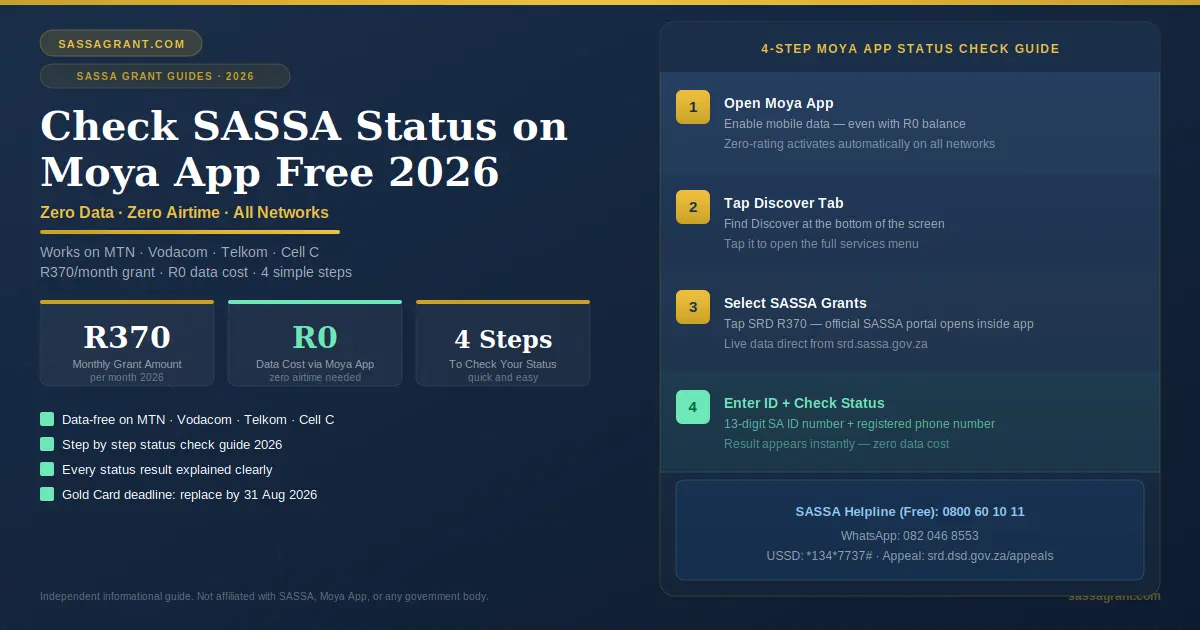
The Moya App lets you check your SRD R370 grant status completely free. No data required. No airtime needed. Open the app, tap Discover, select SASSA Grants, enter your ID and phone number, then tap Check Status. It works on every network in South Africa, like MTN, Vodacom, Telkom, and Cell C. These all support the Moya App even with a R0 balance on your phone.
To qualify for the SRD R370 grant, your monthly income must be less than R625. This is according to the SASSA means test. This means you are already living on very little income. So, spending money on data just to check your grant status seems even more difficult. The Moya app understands this. That is why it gives you completely free access. No cost at all.
- What Is the Moya App and Why It Matters for SRD R370
- Is the Moya App Safe and Official
- How to Moya App Download and Register
- How to Check Your SRD R370 Status: Step by Step
- What Every Status Result Means
- How to Apply for SRD R370 Through the Moya App
- SRD R370 Payment Dates 2026
- Important 2026 Updates You Must Know
- Moya App Not Working: Quick Fixes
- Scam Warning
- Frequently Asked Questions
- Key Takeaways
- Sources and References
- ✓Moya App is data-free on MTN, Vodacom, Telkom, and Cell C. Zero airtime or data balance needed.
- ✓It is not an official SASSA app. It connects you securely to the real government website.
- ✓Use the same phone number registered with SASSA. Any difference gives no result.
- ✓Approved and Payment Approved are different. Approved = you qualified. Payment Approved = money is moving.
- ✓Pending is normal early in the month. Wait 7 to 14 days before calling the helpline.
- ✓Gold Card deadline is 31 August 2026. Swap to the Postbank Black Card now. Learn how to renew your SASSA card here.
- ✓Never update banking details through Moya. Use our guide on updating banking details or the official portal only.
- ✓Keep the app updated to latest version 8.0.0 or higher for smooth data-free access.
1. What Is the Moya App and Why It Matters for SRD R370
The Moya App is published by Moya App (Pty) Ltd. It is a South African private company. When you open the app and check your status, it opens the real government website through a secure encrypted connection. What you see is live, accurate, and exactly the same information you would see on SASSA official website.
The Moya App is the free tool that millions of South Africans use to check their SRD R370 grant status without spending a single cent on data. This matters deeply. This is made possible by a technology called zero-rating. The app partners with major mobile networks. It pays for your data on your behalf. So you get connected to the official Moya App at no cost to you.
2. Is the Moya App Safe and Official
The Moya App is not an official government application. SASSA did not create it. But it is safe for checking your SRD R370 status. When you check your status inside the app, Moya opens the real SASSA website through a secure encrypted gateway. Your information goes directly to the government server. Moya only provides the free connection.
SASSA is very clear on one rule. Only use the official portal at srd.sassa.gov.za for applications and banking detail changes. Never do sensitive actions through any third-party platform. For a complete list of all SASSA grant types, visit our overview page.
Only download the Moya App from these official stores:
| Device | Download Store |
|---|---|
| Android | Google Play Store |
| iPhone | Apple App Store |
| Huawei | AppGallery |
3. How to Moya App Download and Register
Downloading the Moya App is free. You need Wi-Fi or data only for the initial download. After that, all SASSA services inside the app are data-free. Registration takes under five minutes.
- 1
Install the App
Open your app store. Search “Moya App.” Install the official app by Moya App (Pty) Ltd. Accept permissions. Agree to Terms and Conditions.
- 2
Set Your Country
Set country to South Africa. The +27 code must appear. Enter your active mobile number. Tap Continue.
- 3
Verify via OTP
A 6-digit OTP arrives via SMS. Enter it. Your registration is complete. Use the same phone number linked to your SASSA application. A different number means no status results. If you need to change your phone number with SASSA, follow our step-by-step guide.
4. How to Check Your SRD R370 Status: Step by Step
To check your SRD R370 status on the Moya App, follow these steps.
- 1
Open Moya App
Tap the app icon on your phone. You have to make sure your mobile data is switched on, even if you have zero balance. It will then activate, and the Moya app will install automatically.
- 2
Tap “Discover”
Find the Discover tab at the bottom of the screen. Tap it to open the services menu.
- 3
Select SASSA Grants
Tap the SASSA Grants option. Then tap SRD R370. The official SASSA portal opens inside the app.
- 4
Enter ID and Check Status
Enter your 13-digit ID number and registered phone number. Tap Check Status. Your result appears instantly at zero data cost.

5. What Every Status Result Means
Your SRD R370 status result changes every month. SASSA re-evaluates your eligibility each cycle. Understanding your results saves you from office visits.
Approved
You passed all checks this month. Wait for your Pay Day to appear. Keep checking every 2 to 3 days.
Payment Approved
Money is being processed. Check your Pay Day date on the portal and collect.
Pending
SASSA is still verifying your details. Wait 7 to 14 days. This is normal early in the month.
Declined
You did not qualify this month. Check the reason. Appeal within 90 days online at the official appeals portal.
Referred
Manual review needed. Call 0800 60 10 11 immediately.
Identity Verification Failed
ID does not match with Department of Home Affairs records. Visit SASSA office with your original ID.
Bank Details Pending
Approved but no bank account linked. Update immediately using our banking details guide.
Approved vs Payment Approved: Know the Difference
Approved means you qualified this month. Payment Approved means your money is actually moving. Many people panic when they see Approved with no Pay Day yet. This is completely normal. The Pay Day appears a few days after the Approved status. Keep checking the portal every 2 to 3 days.
Why Does Declined Happen?
The SASSA system runs your details through multiple databases every month. They verify income through SARS, UIF, NSFAS, Home Affairs, and your bank account. If any deposit above R625 appears in your account, even a one-time gift, the system flags it as income. Go to srd.dsd.gov.za/appeals. Each declined month needs its own appeal. You have to do it within 90 days. Do not miss that window.
6. How to Apply for SRD R370 Through the Moya App
You can start your SRD R370 application through the Moya App. The app redirects you to the official SASSA portal. Your application goes directly to the government system. For a complete guide on how to apply for SASSA grants online, visit our detailed tutorial.
- 1
Open the App
Open the Moya App. Tap Discover. Tap the SRD R370 option.
- 2
Complete the Application
The official SASSA application page opens inside the app. Fill in your details carefully.
- 3
Submit and Confirm
Review everything. Submit. You will receive a confirmation SMS once SASSA processes your application.
Information You Will Need
| Information | Requirement |
|---|---|
| Full Name | Exactly as on your ID document |
| SA ID Number | 13 digits. No spaces. |
| Date of Birth | From your ID document |
| Residential Address | Where you currently live |
| Mobile Number | Must be active and registered in your name |
| Bank Account | Must be in your own name only |
7. SRD R370 Payment Dates 2026
The SRD R370 grant has no single fixed date for everyone. SASSA sends payments in batches. Each approved person receives a personal Pay Day on the portal. Check from the 20th of each month. Never go to the ATM before your Pay Day shows on the app. For all SASSA grants, see our complete SASSA payment dates schedule 2026.
| Month | Payment Window | When to Start Checking |
|---|---|---|
| May 2026 | 25 to 30 May | From 20 May |
| June 2026 | 24 to 30 June | From 20 June |
| July 2026 | 24 to 30 July | From 20 July |
| August 2026 | 24 to 30 August | From 20 August |
| September 2026 | 24 to 30 September | From 20 September |

8. Important 2026 Updates You Must Know
Biometric Verification Is Now Active
SASSA introduced stronger identity checks in 2026. If your application is flagged as high risk, you will receive an SMS with a secure link. Click the link. Take a selfie. The system matches your face to your Home Affairs photo. The biometric verification link is not data-free. If you cannot complete it on your phone, visit your nearest SASSA office. They have free Wi-Fi and self-service kiosks. Do not ignore a biometric request. Your payment will be suspended until it is completed. This system has already saved R44 million per month in fraudulent payments.
Postbank Black Card Deadline: 31 August 2026
The old SASSA Gold Card stops working on 31 August 2026. If you still have a Gold Card, you must act now. Visit Shoprite, Checkers, Boxer, or Usave to collect your new Postbank Black Card. To find your nearest collection point, dial *120*218*3# and select your province. Read our guide on how to switch from SASSA Card to Capitec Bank for more options.
SRD Grant Redesign Is Coming
In his February 2026 State of the Nation Address, President Cyril Ramaphosa announced the SRD grant will be redesigned to move toward a livelihoods support instrument. Future portal updates may require applicants to complete skills profiles and eligibility tests online before applying. This makes the Moya App data-free access even more important as the process becomes more digital.
Income Threshold Legal Battle
In 2025, Pretoria High Court Judge Leonard Twala ruled the R625 income threshold unconstitutional. The National Treasury appealed in 2026, stating increasing the threshold would cost over R93 billion annually. The legal battle continues. For now, the R625 limit still applies strictly.
9. Moya App Not Working: Quick Fixes
If the Moya App is not working, the cause is usually an outdated version, corrupted cache, wrong phone settings, or data not being switched on. Here is how to fix each problem.
| Problem | Fix |
|---|---|
| Error or blank screen | Clear cache: Go to settings, then Apps. Open Chrome or Mozilla. Find the Storage/Memory tab. Clear Cache. Now, you can restart the app. |
| Status page stuck loading | Go to Moya App settings. Find My Profile. Switch on Background Activity. |
| OTP not arriving | Check signal. Wait two minutes. Tap Resend SMS. Restart your phone if nothing arrives. |
| No results after entering details | You may be using the wrong phone number. It must exactly match your original SASSA application number. |
| App version too old | Update immediately through your app store. Download and install the Moya App latest version 8.0.0. |
| OTP verification failing | Your phone clock may be wrong. Go to Settings. Click on Date and Time. Select your country or region. Or switch to automatic time zone. |
| Data-free not working | Turn on mobile data even if the balance is zero. Zero rating is only active when data is enabled. |
10. Scam Warning
Criminals create fake Moya apps and fake SASSA status check websites. They steal your personal details and your grant money. Stay safe:
- Only download the Moya App from the Google Play Store, Apple App Store, or Huawei AppGallery. Never from a link in an SMS or WhatsApp message.
- Inside the app, only check status through Discover Section.
- The only official SASSA WhatsApp number is 082 046 8553. It has a green verified tick.
- Never share your PIN or OTP with anyone claiming to be from SASSA or Moya.
- Report suspicious activity to SABRIC at www.sabric.co.za.
If you have been approved but see no payment date, our dedicated guide explains what to do next.
11. Frequently Asked Questions
13. Sources and References
- South African Social Security Agency. SRD Portal: srd.sassa.gov.za. Accessed May 2026.
- Moya App (Pty) Ltd. Official Application. Google Play Store. Accessed May 2026.
- Department of Social Development. Appeals Portal: srd.dsd.gov.za/appeals. Accessed May 2026.
- South African Banking Risk Information Centre. Scam Warnings: sabric.co.za. Accessed May 2026.
- Postbank South Africa. Black Card Migration Deadline August 2026. Accessed May 2026.
- President Cyril Ramaphosa. State of the Nation Address. February 2026.
- National Treasury South Africa. SRD Budget Allocation 2026/2027.
- 12 May 2026. Article published. Payment dates for May to September 2026 confirmed. Biometric verification section added. Postbank Black Card deadline confirmed.