
How to Change SASSA Banking Details to TymeBank for SRD R370
Change your SRD R370 SASSA banking details to TymeBank online at srd.sassa.gov.za in minutes, or do it in person at a SASSA office if the portal does not work.
Change Your SRD R370 Banking Details Online
Visit the official SASSA SRD portal, enter your ID number, and follow the secure SMS link.
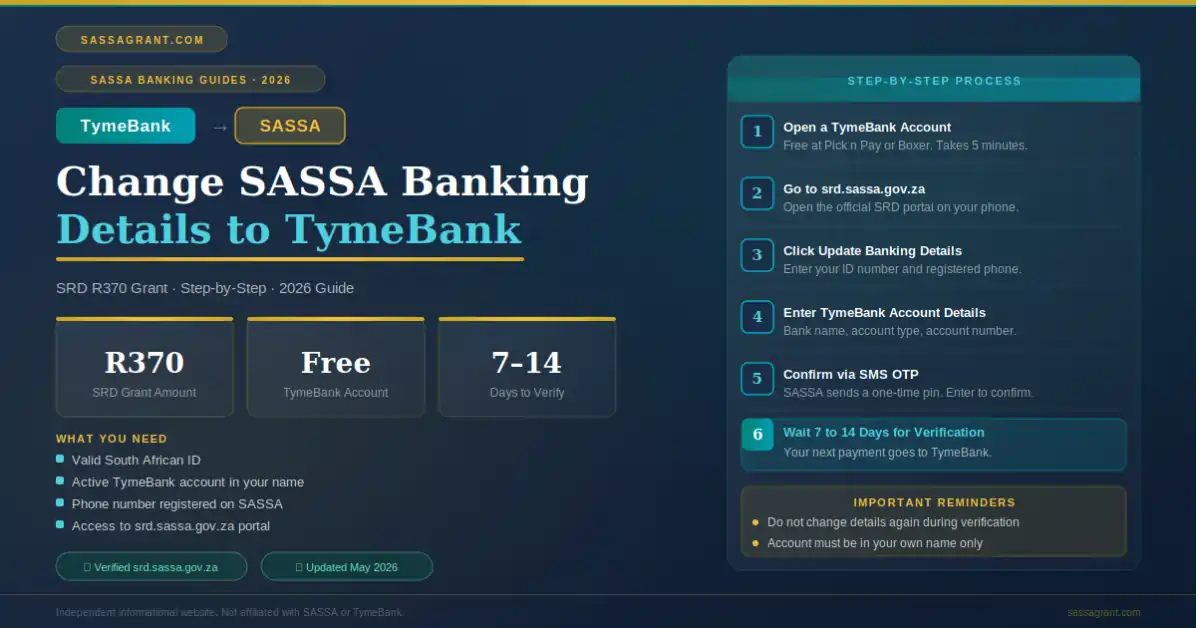
To change your SASSA banking details to TymeBank for the SRD R370 grant, go to the official portal at srd.sassa.gov.za. Enter your 13-digit South African ID number. Then wait for a secure SMS link on your registered phone. Click that link, fill in your TymeBank account details, and submit. The change usually takes a few days to 21 working days to become active.
You do not need to visit a SASSA office to make this change. The entire process can be done from your phone, provided the number you used when first applying for the grant is still active.
- What Is the SRD R370 Grant and Why Change Banking Details
- What You Need Before You Start
- How to Open a TymeBank Account
- How to Change SASSA Banking Details to TymeBank Online
- How to Change SASSA Banking Details In-Person
- How Long Does the Change Take
- Important Rules to Avoid Payment Problems
- What to Do If the Online Process Fails
- Frequently Asked Questions
- ✓The full change can be done online at srd.sassa.gov.za. No need to visit a SASSA office.
- ✓You need three things: Your 13-digit SA ID, your registered phone number, and your TymeBank account details.
- ✓Open your TymeBank account first at a Pick n Pay or Boxer kiosk before you start the SASSA change.
- ✓SASSA sends a secure SMS link. Click it, enter your TymeBank details, and submit.
- ✓The account must be in your own name, exactly as it appears on your ID. Friend or family accounts are rejected.
- ✓The change takes a few days to 21 working days. Submit early in the month to be safe.
- ✓Only use srd.sassa.gov.za. Never share your OTP or SMS link with anyone.
- ✓If the online method fails, visit a SASSA office or call 0800 601 011 for free help.
1. What Is the SRD R370 Grant and Why Change Banking Details
The SRD R370 grant is a monthly payment from the South African government. SASSA manages it. And it helps people who have no income and no other support. Many people receive this grant every month.
But sometimes your old bank account no longer works. Or you want to switch to a better option. And many South Africans are now choosing TymeBank for their SASSA payments. This is because TymeBank is free to open and easy to use. And it accepts direct SASSA payments without any problem.
The good news is that you do not need to visit a SASSA office to make this change. You can do the entire process online from your phone.
2. What You Need Before You Start
Before you change your SASSA banking details, make sure you have everything ready. This will save you time and avoid frustration.
Item 1: Your 13-Digit South African ID Number
You will need this to log into the SASSA SRD portal. Without it, you cannot begin.
Item 2: Your Registered Phone Number
SASSA will send a secure SMS link to the phone number you used when you first applied for the grant. So that phone must be working and with you.
Item 3: Your TymeBank Account Details
You need your TymeBank account number and your account type, which is either savings or transactional. If you do not have a TymeBank account yet, open one first. Section 3 below explains how.

Start Here: srd.sassa.gov.za: Change Your Banking Details
3. How to Open a TymeBank Account
If you do not have a TymeBank account yet, you must open one first. And it is very easy to do.
- 1
Find a TymeBank Kiosk
TymeBank kiosks are available inside major retail stores. Look for them at Pick n Pay, Boxer, and other large stores near you. You do not need to go to a bank branch.
- 2
Bring Your South African ID
Take your green ID book or your smart ID card. This is the only document you need to open an account.
- 3
Follow the Kiosk Instructions
The kiosk screen will guide you through the process. It takes only a few minutes. At the end, you will have a working TymeBank account.
- 4
Save Your Account Details
Write down your TymeBank account number and your account type. You will need these when you update your SASSA details. You can also download the TymeBank app to see your account information anytime.
4. How to Change SASSA Banking Details to TymeBank Online
This is the fastest and easiest method. You can do it right now from your phone. Follow each step carefully.
- 1
Go to the Official SASSA SRD Portal
Open your internet browser and go to srd.sassa.gov.za. This is the only official website. Do not use any other website. And do not click links sent to you by strangers.
- 2
Find the Banking Details Section
Scroll down the homepage. Look for the section that says “How do I change my banking details”. Click on it. It will open a box where you can enter your ID number.
- 3
Enter Your ID Number
Type your 13-digit South African ID number into the box. Check it carefully for any mistakes. Then click submit.
- 4
Wait for the Secure SMS Link
SASSA will send an SMS to your registered phone number. This happens automatically. The SMS contains a secure and unique link. Open that SMS and click the link. It will take you to a safe banking update page.
- 5
Enter Your TymeBank Details
Once the secure page opens, look for the payment method options. Choose Bank Account. Do not choose cash send or Post Office. Then fill in the fields below.
- 6
Submit Your New Details
When you are happy that everything is correct, click Submit. SASSA will receive your new details and verify them with TymeBank. You will get a confirmation message when the process is complete.
Fields You Will See on the Banking Page
| Field | What to Enter |
|---|---|
| Payment Method | Bank Account |
| Bank Name | TymeBank |
| Account Number | Your specific TymeBank account number |
| Account Type | Savings or Transactional (matching your TymeBank account) |
Read every number twice before moving on. One wrong digit can cause your payment to fail.

5. How to Change SASSA Banking Details In-Person
If the online process does not work for you, you can visit a SASSA office in person. This takes more time but it always works.
- 1
Open Your TymeBank Account First
Do this before you visit the SASSA office. You need your TymeBank account details ready when you arrive.
- 2
Gather Your Documents
Bring your South African ID, your TymeBank account statement or proof of account, and your SASSA reference number if you have it.
- 3
Visit Your Nearest SASSA Office
Go to the SASSA office in your area. Tell the staff that you want to change your banking details. They will give you a Banking Details Change Form.
- 4
Fill In the Form
Write your TymeBank details on the form. Make sure your name matches exactly as it appears on your ID. Then hand the form back to the staff member.
- 5
Track Your Application
After you submit the form, you can check the status of your change on the SRD portal at srd.sassa.gov.za. It may take a few days to update.
6. How Long Does the Change Take
The SASSA banking details change does not happen instantly. Once you submit your new TymeBank details, SASSA sends them to the bank for verification. This verification process can take anywhere from a few days to 21 working days.
If you submit your new details late in the month, your next R370 payment may still go to your old account. This is because the change may not be active yet. So try to make the change as early in the month as possible. That gives SASSA enough time to process everything before your next payment date. For more on SASSA payment dates 2026, check our full schedule.
Best Case: A Few Days
Clean submission, name matches your ID, account verified by TymeBank quickly.
Standard: Up to 21 Working Days
Most updates fall in this window. Submit early in the month to be safe before the next payment cycle.
Rejected
Name mismatch with your ID, account in someone else’s name, or wrong account number entered. If rejected, submit an appeal online or visit a SASSA office.
7. Important Rules to Avoid Payment Problems
There are a few rules that you must follow. If you do not follow them, your payment could be delayed or rejected.
Your Account Must Be in Your Own Name
The TymeBank account must be registered in your name. And that name must match exactly what is on your green ID book or smart ID card. SASSA uses an automatic identity verification system. If the names do not match, your update will be rejected immediately. You cannot use a friend’s or family member’s account. For general guidance on updating SASSA banking details, see our complete guide.
Use Only Your Registered Phone Number
The SMS link goes to the phone number you used when you first applied for the SRD grant. If you no longer have that number, the online process will not work. In that case, visit a SASSA office in person. Learn how to change your phone number with SASSA if needed.
Use Only the Official SASSA Website
Only use srd.sassa.gov.za. Never enter your personal details on any other website. And never share your OTP or SMS link with anyone. Scammers often create fake SASSA websites to steal your personal information.
SASSA staff will never ask for your OTP, SMS link, or password, not on a call, not on WhatsApp, not at a SASSA office. If anyone asks, it is a scam.
Report fraud to 0800 601 011 or email [email protected].
8. What to Do If the Online Process Fails
Sometimes the SASSA SRD portal has technical problems. Do not panic if this happens to you. There are simple things you can try.
- Try a Different Browser. If the page does not load properly, switch to a different internet browser. Google Chrome and Firefox usually work well.
- Try a Different Device. If your phone is giving problems, try using another phone or a computer. Sometimes the issue is with the device and not the website.
- Try Again Later. The portal gets very busy around payment dates. If it is slow or not responding, wait a few hours and try again.
- Call the SASSA Helpline. If nothing works, call SASSA directly on 0800 601 011. This is a free call. The support team can help you update your details or guide you to your nearest SASSA office. You can also use the Moya App to check your SASSA status for free.
9. Frequently Asked Questions
Sources and References
- →SASSA Official SRD Portal. srd.sassa.gov.za. Accessed May 2026.
- →TymeBank Official Website. tymebank.co.za. Accessed May 2026.
- →South African Social Security Agency. sassa.gov.za. Accessed May 2026.
- →SASSA Helpline. 0800 601 011. Accessed May 2026.
- →National Credit Regulator South Africa. ncr.org.za.
- May 2026: Article published. Includes online and in-person procedures, processing windows, scam warnings and a 10-question FAQ.